Precision site planning in your browser
Plan any site.
Instantly.
Lot Sketch is the fastest way to lay out parcels, buildings, parking, and roads to scale — no CAD software, no downloads, no learning curve.
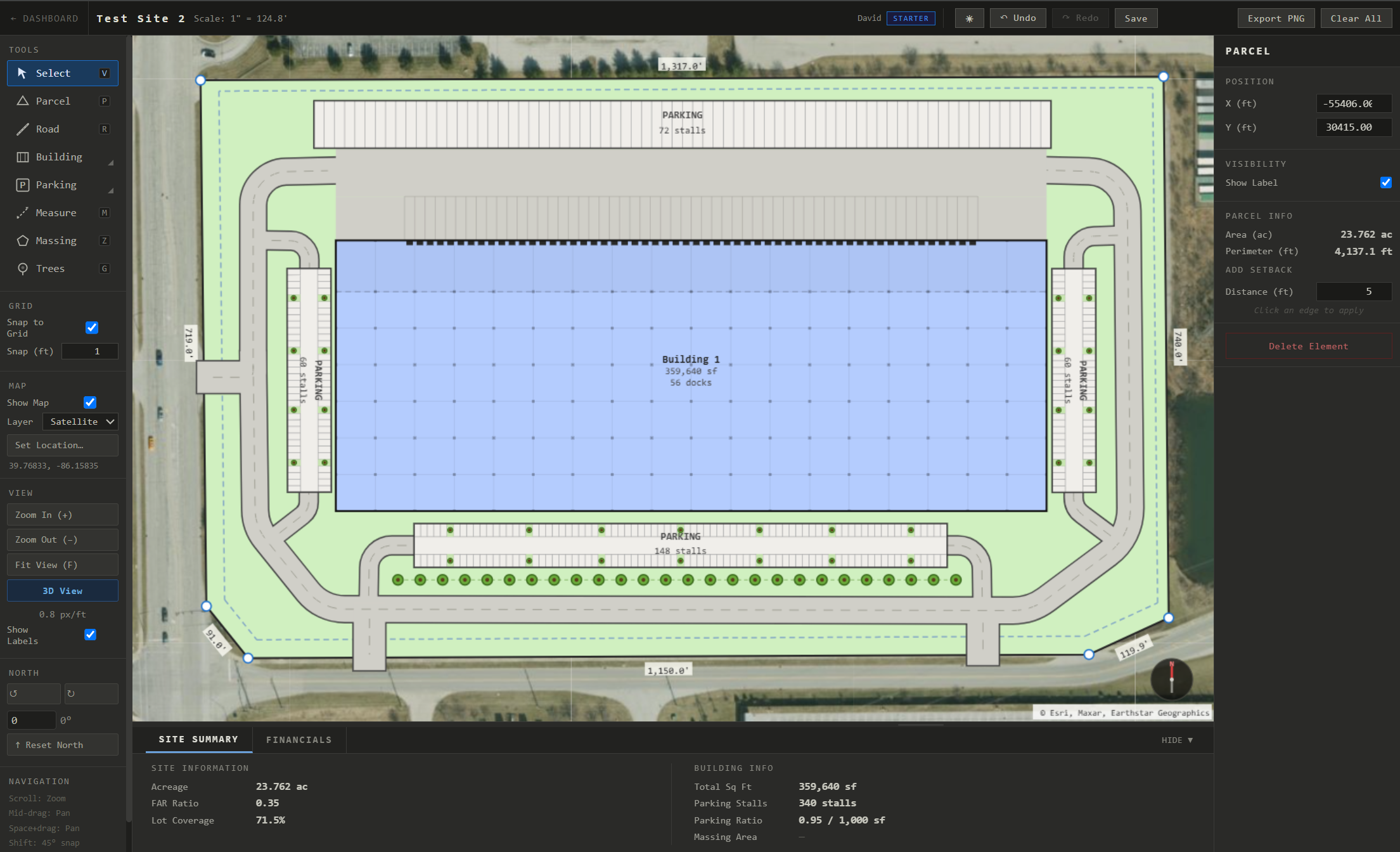
Lot Sketch is the fastest way to lay out parcels, buildings, parking, and roads to scale — no CAD software, no downloads, no learning curve.
From the parcel to a 3D concept — the tools developers and real-estate teams reach for on day one.
Garden, infill, wrapped & podium types with amenity spaces — massed in seconds.
Column grids, dock doors, truck courts & cross-dock layouts — in 2D and full 3D.
Turn raw land into a numbered plat, then drop a house on every lot.
Trace a boundary and get a full stall field with aisles and islands.
Click a property and pull its real boundary straight from public GIS.
Screen a site's constraints before you commit a dollar to design.
One-click 3D with perspective and isometric cameras for the client meeting.
Professional-grade site planning tools without the professional-grade price tag or learning curve.
Parcels, roads with intersections, industrial buildings, multifamily and townhomes, single-family lots, subdivision, parking, landscaping, and measurement lines — all in one canvas.
Trace a boundary and Parking Fill generates a complete stall layout automatically — perimeter ring, drive aisles, and landscape islands — with dedicated access points marking exactly where traffic enters and exits.
Flip any plan into a full 3D view with one click — everything extrudes automatically. Orbit the site and switch between perspective and isometric cameras, no separate model required.
Acreage, FAR ratio, lot coverage, building square footage, parking stall count, and parking ratio update in real time as you draw.
Export clean PNG files suitable for presentations, feasibility studies, and client deliverables — with one click, no watermarks.
Runs entirely in your browser. Open a tab, start planning. Works on any device with a modern browser — no plugins, no downloads, no IT approval.
Configurable grid snapping at any increment — quarter foot to ten feet — ensures every element aligns precisely. Buildings also snap to structural column bay multiples, so your layouts reflect real construction dimensions from the start.
Anchor your plan to a real-world location with street or satellite map tiles. Set any address or GPS coordinate as your reference point.
Place individual trees or evenly-spaced tree rows with a single click or drag. Adjust crown radius and row spacing to suit your landscaping plan.
Model gross income, NOI, vacancy, and operating expenses per building. Run development cost scenarios and see yield-on-cost and cap rate returns instantly.
Click to place vertices and define your site boundary. Enter an address to overlay the real satellite view.
Add roads, buildings, parking, and massing zones with drag-to-size controls. Configure dock doors, column bay spacing, speed bays, and stall dimensions with precision.
The live summary panel shows acreage, FAR, lot coverage, building SF, and parking ratio — updated with every change you make.
A free account unlocks every drawing tool — no credit card, no time limit. Paid plans add saving, exporting and 3D view.